Thursday, May 5, 2011

Wednesday, April 27, 2011
1- Is the Turing test a valid test of intelligence? Why or why not?
I don't think it is because it seems to me that the Turing test is really testing the response a computer would have rather than its intelligence. Of course its easy to tell the response of a computer because it is so technical while a human is more relaxed and prone to error. Computers can retrieve facts better than humans. It's testing the ability of a computer to be a human not its intelligence.
2- List several mental task that people do better than computers. List several mental tasks that computers do better than people. Can you find any general characteristics that distinguish the items on the two lists?
People Computer
- translating - processing
- planning -math
-searching
- synthesizing
General characteristics that distinguish the two are technical, and natural.
I don't think it is because it seems to me that the Turing test is really testing the response a computer would have rather than its intelligence. Of course its easy to tell the response of a computer because it is so technical while a human is more relaxed and prone to error. Computers can retrieve facts better than humans. It's testing the ability of a computer to be a human not its intelligence.
2- List several mental task that people do better than computers. List several mental tasks that computers do better than people. Can you find any general characteristics that distinguish the items on the two lists?
People Computer
- translating - processing
- planning -math
-searching
- synthesizing
General characteristics that distinguish the two are technical, and natural.
Friday, April 15, 2011
Discussion Question
You are planning on starting your own business selling clothes. Discuss pros and cons for starting an e-business.
Pros: A pro of starting an e-business is that its easier to sell if say one doesn't have a store that they can sell from; its more convenient. Also, the way of payment is better because if you had a store you would have to transfer the physical money into the bank account while with e-commerce one can get payment directly into their bank account through debit or credit.
Cons: A con could be that shipping and packaging the clothing could be a hassle. Also, if the business isn't marketed enough no one will know about it and there won't be very many customers. Another is that if one doesn't take time to set up the merchandise properly with a variety, then people won't be interested. Another is that you won't be able to establish a personal relationships with customers and thus less loyalty; customers are looking for the cheapest prices. Another is that the payment system can be unreliable depending on the system used. Also, if for some reason a customer is unsatisfied they can comment on their experience and lessen the business's good reputation. Also, it isn't available to everyone; not everyone has access to a computer or Internet access.
Wednesday, April 13, 2011
Chapter 13: Electronic Commerce and E-commerece RQs
2. Is e-commerce possible without the Internet? Explain your answer.
It is possible but today e-commerce is largely Internet based. Most business executives believe that the Internet is essential or important to their company's success. It continues to grow at a rapid pace.
3. Describe the three forms of commerce.
Business-to-business (B2B)- It represents interorganizational information systems. A company handles transactions within its own chain and with other businesses and organizations, such as its suppliers, distributors, and bank.
Business-to-consumer (B2C)- It represents retail transactions between a company and individual customers. Examples are dot com companies such as Amazon.com and E*Trade.com
Consumer-to-consumer (C2C)- It represents individuals, organizations, or companies that are selling and buying directly with each other via the Internet such as eBay.
4. What are the purposes of an intranet? What are the main characteristics of an intranet?
The purpose of intranet is to provide users within an organization easy access to information. An intranet usually consists of a network, at least one computer with server software installed (TCP/IP) and other computers with client software installed (including TCP/IP and Web browsers). Physical networks such as LAN or WAN are used and most use Ethernet to physically connect computers, printers, and other hardware including middleware for physical communication connection.
5. What are three important ways companies use intranets?
Companies use intranets to provide employees access to important information for their jobs, to facilitate employees' teamwork and collaboration within also in departments, and to process internal company transactions online.
6. What is the purpose of an extranet? What are the main characteristics of an extranet?
The purpose of an extranet is to connect intranets of two or more companies in an e-marketplace. Some of the characteristics are a secure private network, a public network, and a virtual private network network.
7. Describe some of the issues a company must deal with to successfully conduct business with consumers over the Internet.
Some issues a company must deal with so that they successfully conduct business with consumers over the Internet is the speed of transactions, large, up-to-date product selection, ease of use, secure transactions, and after-sale features.
8. List the capabilities e-commerce should provide.
- have a Web Server, both hardware and software
- Server must have capacity to handle the initial traffic on the site or have the ability to expand as Website traffic increases.
-E-commerce software must provide access to business information and on-demand customer service, transaction processing, typical calculations for a transaction including computing taxes and shipping costs, and collect payments from customers accurately and securely.
9. Describe some ethical issues involved in electronic commerce.
-A person's private info being used without permission.
- issues of ownership
- tracking of user behavior on Web site
All this has to do with the ethical issues of privacy, intellectual property and such.
Discussion Question 4/13
If someone discovers a cure for the common cold, should he or she hide it to protect all the jobs of all the people who work in the cold-medicine industry?
I think that they should because I'm sure that those who have jobs in the cold-medicine industry can get other jobs making medicine for a different disease since there are so many others diseases. Also, I think that the benefit of the cure overcomes that of the negativity of the job loss. Also, from the cure new jobs are really created such as someone who makes vaccination for the cure. Identify reasons why so many people react negatively to advances in technology that eliminate some jobs. One reason is that when one's job is eliminated it can be extremely hard to find another. Additionally, another reason do to this is that when one doesn't have a job it usually means that they are experiencing financial problems and even sometimes in today's recession homelessness. Another could be that they cannot provide for their family and may have to give them up for adoption.
Sunday, April 10, 2011
Chapter 11: Computers at Work, School, and Home RQs
2. What are the major components of the automated factory?
a. Robots- computer controlled machines that are designed to perform specific tasks.
b. Computers- that help track inventory, time the delivery of parts, control the quality of production, track wear and tear on machines, and schedule maintenance.
c. Engineers- used CAD and CAM technology softwares to design products and the machines that carry out the task of making those products.
d. Web cameras- allow workers and monitors to watch the production really anywhere, even in a different continent.
6. What is de-skilling? What is up-skilling? Give examples of each.
De-skilling is when a job is transformed so that it requires less skill. For example, computerized cash registers replace numbered buttons with button labels that may say"large hamburger". Therefore clerks who use these machines don't really need to know math or the prices of items, they just press buttons and the computer does the rest. Up-skilling is when a job becomes more technical, requiring the worker to have more skills. For instance, a lot of clerical jobs become more technical when offices integrate databases, spreadsheets, email systems, Internet connections, fax modems, and other computer technology.
7. Describe several of the controversies surrounding the electronic sweatshop.
One thing is that these workers experience health issues and even anxiety and stress. Another is that workers are only paid minimum wage. Also, a rising number of electronic sweatshops are located across national borders from corporate headquarters in countries with lax labor laws and low wage scales.
9. What were the goals of education in the industrial age? Which are still appropriate in the information age? Which are not?
The goals in the information age were to teach students the basic facts and survival skills they would need for jobs in industry and agriculture- jobs that they would probably have for their entire lives. Students should learn in the same ways and the same things. The teacher's job is to "pour" facts into the students and occasionally test their level of knowledge. Students are to work individually, absorb facts, and spend most of their time sitting quietly in straight rows. Those that are still appropriate in the information age are the skills needed to survive in the world of jobs. Those which are not are that students should learn in the same way and that students are expected to work individually and absorb facts.
10. What kind of an education does a student need to prepare for living and working in the information age?
They need an education where these principles are executed: technological familiarity, literacy, mathematics, culture, communication, and learning how to learn. Learning must be a lifelong process. Students must learn more facts; the must learn how to think and learn.
12. Describe how multimedia can be used by teachers and students in the classroom. Give several examples.
Multimedia can be used by teachers through simple slide shows, elaborate graphical simulations,
and multimedia demonstrations such as videos. Multimedia can be used by students through CD-ROMs, videos, interactive kiosks, and Web pages.
14. Technology alone is no guarantee that students will learn better or faster. What else is necessary to ensure success?
To ensure success, schools need to include teacher training, ongoing support, and restructuring of the traditional "factory model" curriculum.
16. What are smart cards, and how are they used?
Smart cards look like standard credit card, but instead of a magnetic strip, it contains an embedded microprocessor and memory. Smart cards basically replace magnetic-strip credit cards. They store critical ID information and automatically records transactions for later retrieval.
Saturday, April 9, 2011
Chapter 10: Computer Security and Risks RQs
2. Why is it hard to estimate the extent of computer crime?
This is because much computer crime is undetected and some of those that are detected are not reported to the authorities for fear of embarrassment and a result of even more of a loss due to negative publicity.
3. Describe the typical computer criminal. How does he or she differ from the media stereotype?
The typical computer criminal is a trusted employee with no criminal record who is tempted by opportunity, greed, and financial problems. The typical computer criminal can be clerks, cashiers, programmers, computers operators, and managers. While these might be different to the media stereotype such as former employees seeking to get revenge om their former bosses, high-tech pranksters looking for a challenge, spies looking for classified info, and etc...
4. What is the most common computer crime? Who commits it? What is being done to stop it?
Theft is the most common computer crime. It is committed by spoofers, identity thieves, and usually anyone who wants to steal money, goods, info, and computer resources. To stop it computer users are now using helpful tips to protect themselves against theft such as making all online purchases using a credit card, checking for secure, reliable websites, not disclosing personal info over the phone, handling email with caution......
6. Describe several different types of programs that can be used for software sabotage.
Viruses- software that spreads from program to program or disk to disk, and uses each infected program or disk to make copies of itself. Some viruses reproduce, display images on computer's screen, destroy data, or erase disks.
Worms- uses computer hosts to reproduce themselves. They travel interdependently over computer networks, seeking out uninfected workstations to occupy.
Trojan Horses- it performs a useful task while at the same time carrying out some secret destructive act.
7. What are the two inherent characteristics of computers that make security so difficult?
1. A computer does exactly what it is programmed to do, including reveal sensitive information. Any system that can be programmed can be reprogrammed by anyone with sufficient knowledge.
2. Any computer can do only what it is programmed to do
8. Describe several different computer security techniques, and explain the purpose of each.
Biometrics- something about you, like a voice print, fingerprint, retinal scan, facial feature scan, or other measurements of individual body characteristics. This is used to identify a person attempting to access computer equipment because the person attempting to gain access might have the authority to do so, so if the biometric is not matched with that of authorized personnel then that person will not gain access.
Passwords- these are the most common security tools used to restrict access to computer systems.
Access-control software- software that only allows user according to the user's needs. Some users can only open files that are related to their own work. Some users are allowed read-only access to files they can see but not change.
10. In what ways can computer security protect the privacy of individuals? In what ways can computer security threaten the privacy of individuals?
It protects us through passwords so that confidential information that we wish not to be shared with others will not get into the hands of identify thieves and hackers. This is also done through firewalls, biometrics, encryptions, and audits. Some ways in which security threatens privacy is when security systems track every move of an individual, even a minute by minute report on that individual. For instance, the use of an active badge which identifies an authorized or unauthorized person, find that person through computer screen just like security cameras, and remember every single place and instance that individual was at and was doing.
11. What are smart weapons? How do they differ from conventional weapons? What are the advantages and risks of smart weapons?
Smart weapons are missiles that use computerized guidance systems to locate their targets. They differ in that they lessen the use of human capability in tracking targets. The advantages are that they can greatly reduce the amount of civilian destruction in ear is everything is working properly. While the risks are that they reduce the amount of time people have to make life-and-death decisions. As the decision-making time goes down, the chances of making mistakes goes up. Another is software reliability so that if a bug were to penetrate a system it could multiply within no time. One error could cause a big disaster.
Wednesday, April 6, 2011
Discussion Questions 4/6
Do computers increase or decrease efficiency?
Computers definitely increase efficiency in the work place because with computers there is less of a need to use alot of resources such as paper and work gets done faster. For example, spell check is a faster way to correct errors and is less prone to mistakes.
What are some fears generated by the use of tech/computers in the workplace?
Some fears could be that workers feel intimidated to use computers and technology when they have no experience with them and feel that they are not needed and that there job could possibly be in danger because of their lack of skills. Another fear could be that workers could be unsure of reliabilty of the software that they use and the possible loss of files. Another would be security because hackers could hack into files and tamper with important work.
List three job skills that have become obsolete in the 21st century and 3 jobs/skills that have taken their place.
One job that has become obsolete is a paper delivery person who goes around the office and delivers packages to employees. This is really no longer needed because employees can just email what they need to turn in to their bosses and also the bosses can email important things to their empployees. Another obsolete job is an elevator operator because we have technology now that does that now automatically with the press of a button. Lastly, another would be map makers because they no longer need to make maps due to GPS that is easier to understand and directly tells one where to go step by step.
Wednesday, March 23, 2011
10 different top-level domains
- (.edu) Educational sites
- (.com) Commercial sites
- (.gov) Government sites
- (.mil) Military sites
- (.net) Network Administration sites
- (.org) Nonprofit organizations
- (.aero) Air transport organizations
- (.biz) Businesses
- (.coop) Cooperative business such as credit unions
- (.info) Information services
Monday, March 21, 2011
Chapter 9: The Evolving Internet Review Questions
2. Why is it hard to determine how big the Internet is today? Give several reasons.
- The Internet is growing much too rapidly for it to be tracked.
- There is no "Internet Central" that keeps track of user activity or network connections.
- Different types of connections to the Internet results in different degrees of interactivity, thus it is difficult to know what it means to "belong to the Internet".
3. Why are TCP/IP protocols so important to the functioning of the Internet? What do they do?
- TCP/IP are practically the "language" of the Internet that allow cross-network communication for nearly any computer and network. It defines how information transfers between machines and how machines on network are defined by IP addresses or unique addresses.
4. How does the type of Internet connection influence the things you can do on the Internet?
Depending on the Internet connection, it can be much faster than others and more content streaming with higher bandwidth.
6. What do email addresses and URLs have in common?
- They both use the same domain-naming scheme.
- Macromedia Dreamweaver, Adobe Golive, and Microsoft Frontpage are some web authoring software that make it easy to develop Web pages. Basically one lays out text and graphics in the way desired and the software will create an HTML document that looks similar to the original layout when seen on a Web browser. They are good for automating repetitive edits, apply formatting styles across pages, and check for bad links.
- This is because it makes files smaller so that they may be downloaded and played faster.
11. How does push technology differ from standard Web page delivery techniques? How is it used?
- With push technology you subscribe to the updates and information desired and the server delivers it periodically. It is used for company intranets but is increasingly used for the most trivial things such as weather updates.
12. What new services are available as a result of the commercialization of the Internet? What new problems are arising as a result of that commercialization?
- Such new services for example are: the viewing of weather patterns, book flights, buy stocks, sell cars, track deliveries, listen to radio broadcasts, conduct video conferences, organize disaster recovery programs and do countless other functions.
- Such new problems are: spam scams, get rich-quick hoaxes, online credit card thefts, email forgery, child pornography, illegal gambling, online stalking and other condemned acts.
Wednesday, March 16, 2011
Discussion Question 3/16/11
Suppose you have an important message to send to a friend in another city, and you can use the telephone, email, real-time teleconference, fax, or overnight mail service. Discuss the advantages and disadvantages of each. See if you can think of a situation for each of the five options in which that particular option is the most appropriate choice.
The advantages of the telephone would be that its the closest to actual seeing your friend face to face. Also, instead of typing you can express yourself in which you can't always do so with a keyboard. A disadvantage could be that if your friend lives far enough the time zone may be different and not convenient for either yourself or your friend. While with email you can email your friend anytime though you might not get a reply right away. Also, there isa chance that your computer may not be working or even your Internet. Real time conferencing is very nice because you can both talk as if on a telephone and actually see the person as if they are actually there.
Monday, March 14, 2011
Chapter 8: Networking and Digital Communication: Reading and RQs
2. Give three reasons for the importance of computer networking.
- Networks let people to share computer hardware resources, reducing costs, and making it possible for more people to take better advantage of powerful computer equipment.
- Networks let people to share data and software programs, increasing efficiency and productivity.
- Networks let people to work together in ways that are otherwise difficult or impossible.
5. Under what circumstances is a modem necessary f0r connecting computers in networks? What does the modem do?
- When one uses the telephone network to to connect remote computers. The modem connects a computer to a telephone line.
6. Describe least two different kinds of communication software.
- Network Operating System(NOS)- for those who work exclusively on local area networks. It shields the user from the hardware and software details of routine communication between machines.
- Terminal emulation software- this is outside of LAN. It lets a computer function as a character-based terminal - a simple input and output device for sending messages to and receiving messages from the host computer.
- Mailing lists and newsgroups use asynchronous communication while instant messaging uses real-time communication.
- One thing is that you can send your mail instantly and receive it instantly, while with regular mail you have to deliver your mail to the post office or mail box and the least amount of time it takes for you to receive it or for the recipient to receive it is one day. Another thing is that on email you can attach files but with regular mail you cannot. Attaching files is a lot easier than having to print out the document you wish to send.
- Well one thing could be spam because it slows you down and sometimes can cause viruses on your computer. Also, these are easy to hack into and if someone displays too much personal information, it could lead to identity theft.
11. "Money is just another form of information." explain this statement and describe how it relates to communication technology.
- This statement is basically inferring that in the technological world money is just information shared or retrieved or what not. It relates to communication technology because for example nowadays people can easily check their account balances from their mobile phones in which they are communicating with their bank. Also, for business purposes, people can communicate through groupware or even email on budget updates and commerce increases.
- Well this statement much sums up that these technologies each have different purposes. Wi-fi's purpose is to connect wireless handheld computers and devices. While the purpose of Bluetooth is to overcome the differences between mobile phones, handheld computers and PCs so that they can all communicate with each other regardless of the operating system.
Wednesday, March 9, 2011
Database Article Link
FBI turns up faster, more accurate fingerprint identification system
FBI system lays groundwork for future biometrics such as latent palm prints and facial recognition
Monday, March 7, 2011
Tomorrow's Technology and You Eighth Edition:Chapter 7: Reading and RQs
Read pg.224-232 4RQs
2.What is the difference between a file manager and a database-manager system? How are they similar?
- A file manager is a program that enables users to work with one file at a time. However, a true database-management system(DBMS) is a program or system of programs that can manipulate data in a large collection of files. They are similar in that they can both are sufficient for mailing lists and other common data management applications.
- A database is structured with many data files in which these files are made up of one or more tables; it keeps the information together the way a folder in a file cabinet does. Then a database table is a collection of records. A record is the information related to one person, product or event. For instance, in a library's card catalog database, a record contains information on exactly one person. Then these records are further divided into fields. A field contains a discrete, specific piece of information in a record. For example, in a library's card catalog database a field could be title, author, date, etc...
4. What is a query? Give examples of the kinds of questions that might be answered with a query.
- A query is an information request in database terminology. A query could be a search for a specific record or a request to select all records that match a certain criteria such as animals that are cold-blooded or amphibians with teeth .
7. What does it mean to sort a data file?
- To sort a data file means using a command to that lets you arrange records in alphabetic or numeric order based on values in files.
Read p.237-245 4RQs
6. What are the advantages of personal information management software over paper notebook organizers? What are the disadvantages?
- The advantages are that they are easier to understand and easier to use than regular database programs. Also, they are faster and more flexible than notebook organizers. They are good for people on the go especially with notebook or handheld computers. Some disadvantages may be if the user has a hard time using software and particularly does not know how to use it. If one does not have a cell phone or computer well than they would be no need for it.
8. How can a database be designed to reduce the likelihood of data-entry errors?
- A database can be designed to reduce a likelihood of errors by reducing the number of changes. To do this one should use a relational database program because changes in one table are reflected in other tables automatically.
- Legally, the U.S Supreme Court decisions have recognized a right to privacy is implied by other constitutional guarantees though it is not specifically mentioned.
11. Why are computers important in discussions of invasion of privacy?
- This is due to the fact that in today's world everything we do on the computer and Internet are stored in databases.
Wednesday, February 9, 2011
Chapter 7: Database Applications and Privacy Implications
Database- is a collection of information that has been organized in a certain way or a storage container for data. or a collection of info stored on computer disks.
-Making it easy to reference and retrieve
-Example:telephone book-combination of first name and last, receipe cards..
What is a unique identifier?
It is a combination of databases.
Google was launched by Sergey Brin and Larry Page.
Database Software: an application that is designed to maintain databases.
Computerized databases make it easier to store large amounts of info, retrieve info quickly and flexibly,
Database program: a software tool for organizing the storage and retrieval of info
Database: a collection of info stored in an organized form in a computer. Composed of one or more tables, A table is a collection of related info and/or records.
What is a record?
A record is the information relating to one person, product, or event.
Each discrete
The type of info the field can hold is told by its Field type or Data Type.
Database programs allow you to view in:
Form view-show one record at a time.
List view-display several records in lists similar to the way a spreadsheet displays data.
In views, fields can be rearranged without changing the data.
What are Database Operations?
Import: receive data in the form of text files
Browse: navigate through info
Query: find records that match specfic criteria.
Sort: rearrange records.
Print reports, labels, and form letters: A report is an ordered list of selected records and fields in an easy to read format.
What does SQL stand for?
Structured Query Language
-Is a standard language
-Is available for many database management systems
-Allows point and click queries that insulate users from the complexieies of the query language.
Specialized database software: preprogrammed for spefic data storage and retrieveal purposes.
Geographical
Persinal info manager(PIM): an electronic organizer.Functions: -address book, Appointment calendar, to-do list, miscellaneous notes
-Handheld computers can share info with apps such as iCalendar running on PCs an Macintoshes.
File Manager: enables users to work with one file at a time.
Database Management system(DBMS): manipulates data in a large collection of files, cross-referencing between files as needed.
-can be used interactively or controlled by other programs.
Relational database: program is one that allows tables to be related to each other.
-Changes in lne table are reflected in other tables automatically.
To computer scientists, relational database has a technical definition related to:
The underlying structure data
The rules specifying how that data can be manipulated.
Wednesday, January 12, 2011
Chapter 6: Graphics, Digital Media, and Multimedia
Chapter 6: Graphics,Digital Media, and Multimedia

- Graphics: images that are displayed on a screen.
- Digital Media: any type of electronic media.
- Multimedia: collaboration of multiple forms of media.
- Tim Berners-Lee:- invented World Wide Web and is the head of W3C.
Q: What are Bit-mapped Graphics?
Bit mapped Graphics is the representation of graphic images as bit maps by hardware and software.
- Painting Software: in which pixels are painted on a screen with a pointing device.
-translates pointer movements into lines and patterns on the screen.
Definitions
Pixels: little dots of white, black, or color that make images on screen.
Palette: the given set of options of colors to choose from.
Color depth: the number of bits to each pixel.
Resolution: the density of the pixels.
- Image Processing: to edit photos through the computer.
- possible to manipulate and combine photos, it's realistic.
- Digital photo management software make it easy to and automate normal tasks that have to do with capturing, recognizing,editing, and sharing digital images.
What does the digital photo management software do?
-It simplifies and automates regular tasks that have to do with capturing, recognizing, editing, and sharing digital images.
- Object-oriented drawing- better for creating printed graphs, charts, and illustrations. Also, lines are cleaner and shapes are smoother.
-Some programs merge features of both in a single application
-blurs b/t types
-Can test product prototypes
- Computer Aided Design (CAD):
What is the difference between CAD, CAM, and CIM?
-Can test product prototypes
-Cheaper, faster and more accurate than traditional design-by-hand techniques.
-Design backgrounds, borders, templates..
-Print overhead transparencies
-Microsoft Producer
How to make a powerful presentation?
-remember your goal
-remember your audience
-outline your ideas
-keep it simple
-use a consistent design
-be smart with art
-keep each slide focused
-tell them what your going to say, tell them again, tell them what you said.
- Computer-Aided Manufacturing (CAM)- is the process when data related to the product design are put into a program that controls the manufacturing of parts.
- Computer-Integrated Manufacturing(CAM)- refers to the combination of CAD/CAM and is a big step toward a fully automated factory.
Presentation Graphics: automates the making of visual aids for lectures, training sessions, sales demonstrations and others.
- Analog and Digital Video- a video digitizer can convert analog video signals from a TV broadcast or videotape into digital data.
Animation:
-is a computer-drawn picture
-moving from frame to frame to make a movie effect.
Tweening- animator creates key frames and objects and use software to help fill in the gaps.
What is a video digitizer?
-"Is software that takes an analog video still frame and converts it to a digital still image."
- signals are displayed in the computer's screen in real time.
-Digital video cameras capture footage in digital form.
-Digital videos can be copied, edited, stored and played back w/o loss of quality.
- They will soon replace analog video for most applications.
What does nonlinear editing technology do?
-Is a video editing or audio editing system which can perform random access on the source material.
Video editing software: ex: Abode Premiere
- makes it easy to eliminate footage , combine clips from multiple takes, splice together scenes, create specific effects and perform a variety of other activities.
- Morphs are video clips in which one image morphs into another.
- Data Compression- software and hardware used to compress data from movies so that it can be stored easily.
What does broadband mean?
- "telecommunications system of greater bandwidth."
-Audio digitizer- captures sound and stores it as a data file.
-Synthesizer- an electronic instrument that synthesizes sounds using mathematical formulas.
-MIDI( Musical Instrument Digital Interface)- standard that allows electronic instruments and computers to communicate with each other.
What is the differ b/t MIDI and MP3?
MP3 is a patented digital audio encoding format using a form of lossy data compression while a MIDI is a standard that allows electronic instruments and computers to communicate with each other.
-For audio when it digitizes it transfers from sound waves to 0s and 1s.
- Rules of Thumb
Don't Steal
Understand streaming and downloading
Know your file formats.
Don't over-compress- Popular Digital Audio Formats-WAV.AIFF, MP3, WMA, AAC, OGG.
- MIDI-can control electronic musical instruments and sound sources
- Sequence software- turns a computer into a musical composing, and editing machine.
- Electronica- music designed from the ground up with digital technology.
What is the difference b/t hypertext and Hypermedia?
- Hypertext- refers to the info linked in non sequential ways.
- Hypermedia- combines text, numbers, graphics, animations, sound effects, music, and other media .
-Makes slide shows directly on computer monitors, LCD projectors, still images...
-Make an outline-Design backgrounds, borders, templates..
-Print overhead transparencies
-Microsoft Producer
How to make a powerful presentation?
-remember your goal
-remember your audience
-outline your ideas
-keep it simple
-use a consistent design
-be smart with art
-keep each slide focused
-tell them what your going to say, tell them again, tell them what you said.
- Dynamic Media-modern media contains dynamic info
- Interactive Multimedia: a combination of text, graphics, animation, video, music, voice, and sound effects that allows the user to take an active part in the experience.
-uses authoring programs such as Hyperstudio and Metacard
-Binds source documents together to communicate with users in an aesthetically pleasing way.
-Involves programming objects on the screen to react or behave in certain ways under certain conditions.
-example: Macromedia Director MX-includes prewritten behaviors that can be attached to on-screen buttons, images, and other objects.
- Rules of Thumb
- Be consistent in visual appearance
- Use graphical metaphors to guide viewers
- Keep the screen clean to guide viewers
- Include multiple elements to enliven the presentation
- focus on the message
- Give the user control
- Test your presentation
- Virtual reality:combines virtual worlds with networking.
- multiple participants in a virtual space
- representations of each other called avatars
- Tele-immersion: uses multiple cameras and high-speed networks to create a video conferencing environment in which multiple remote users can interact with each other and computer-generated objects.
Wednesday, November 3, 2010
Chapter 5: Productivity Applications
Doug Engelbart Explores Hyperspace

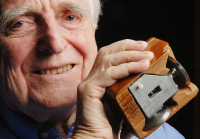
One of the pioneers of the computer hardware and software
In 1968 he showed his Augment system,which were:
- Mouse
- Video display editing- movie making
- Mixed text and graphics, windowing
- Outlining
- Shared-screen video conferencing
- Computer conferencing
- Groupware
- Hypermedia
The Wordsmith's Toolbox
Working with a word processor involves several steps:
- Entering Text
- Editing Text
- Formattting the document
- Proofreading the document
- Saving the document on a disk
- Printing the document
Entering, Editing, and Formatting Text
- Entering Text
- Text is displayed onthe screen and stored in the computer's RAM
- Save your work periodically because RAM is not permanent memory
Editing Text - Navigate to different parts of document
- Insert or delete text at any point
- Move and copy text
- Search and replace words or phrases
- Word Processors and Other word tools
Formatting commands
- Formatting characters
- Characters are measured by the point size
- A font is a size and style typeface
- Serif fonts have serifs of fine lines at the ends of character
- You can use monospaced fonts of spaced fonts
Formatting paragraphs involve: - Margin settings
- Line spacing
- Indents
- Tabs
- Justification
Formatting the documents
- style sheets
- headers and footers
- multiple variable width columns
- graphics
- automatic editing features
- hidden comments
- table of contents and indexes
- coaching and helping feautures
- conversion to HTML
Rules of Thumb: Word Processing Is Not Typing - Use the return key only when you must
- Word wrap moves text to the next line
- Use tabs and margin guides, not the spacebar, to align columns
- WYSIWYG is a matter of degree
- Text that looks perfectly aligned onscreen may not line up on paper.
- Don't underline
- Use Italics and boldface for emphasis
- Use only one space after a period.
- Proportionally-spaced fonts look better without double space
- Take advantage of special characters
- bullets, dashes, curly or smart quotes
The Wordsmith's Toolbox
Outliners and Idea Processors are effective at:
Outliners and Idea Processors are effective at:
- Arranging info into levels
- Rearranging ideas and levels
- Hiding and revealing of detail as needed.
Digital References
- Dictionaries, quotation books, atlases...
- The biggest advantage of the electronic form of speed.
- The biggest drawback is that
Synonym Finders
- A computerized thesarus that gives a variety of synonyms for a chosen
Spelling Checkers
- Compare words in your document with words in a disk-based dictionary.F7
Grammar and Style Checkers
- Analyze each word in context, checking for errors of content
- Check spelling
- Analyze prose complexity using measurements such as sentence length.
Form Letter Generators
- Mail merge capabilities produce personalized form letters.
- Create a datatbase with names
- Create a form letter
- Merge the database with the form letter to create personalized letter.
- Example: give info and email and your name comes up so that it's as if Muhammad Shareef is emailing you personally.
- You can incorporate custom paragraphs based n the recipient's personal data.
- Each letter looks ad of it were individually written.
Collaborative Writing Tools
- Groupware: software designed to be used by a workgroup
- Provides for collaborative writing and editing
- Example: Google documents
- Compares documents versions and highlights differences in documents
Emerging Word Tools
- Processing handwritten words
- Processing words with software that can reliably recognize human speech
- Anticipating a writer's needs, acting as a an electronic editor.
The Desktop Publishing Story
- The process of producing a book, magazine, or other publication includes several steps:
- Writing text
- Editing text
- Producing drawings, photos, and other grahics to accompany the text.
- Designing a basic format for the publication
- Typesetting text
- Arranging text and graphics on pages
- Typesetting and printing pages
- Binding pages into a finished publication
- With modern desktop publishing tech (DTP), the production process can be accomplished with sophisticated tools
Desktop publishing software:
Image-editing software
Page layout software combines ht evarious source docs into a coherent, visually appealing publication.
QuarkXpress
PageMaker
Adobe InDesign
Rules of Thumb:
Plan before you publlish
Use appropriate fonts.
Don;t go style crazy
View your document through your reader's eyes
Learn from the masters
Formulas can be:
Relative
Linking spreadsheets together
Financial management software: Quickbook - gives reliability
Mathematica
Statistical Software: Beyond Spreadsheets
Scientific Visualization
Scientific visualization software shape
Wednesday, October 20, 2010
Chapter 1: Our Digital Planet
- The computer is a versatile tool.
ex: compute taxes, deploy missile
- All computers take in information ca;;ed input and give out info called output.
- Hardware: the physical part
- Software the instructions that tell the software what to do.
- 1939: Konrad Zuse-first digital computer
- 1943: First electronic digital computer called Colossus by mathematician Alan Turing.
- 1939: Professor John Atanasoff developed possibly the first electronic digital computer, the Atanasoff-Berry Computer(ABC)
- 1944: Professor Howard Aiken developed the Mark I, by a one million dollar grant from IBM.
- John Mauchly and J. Presper Eckert helped the U.S effort in World War II by constructing a machine to calculate trajectory tables for new guns.
- After the war, John Mauchly and J. Presper Eckert started a private company called Sperry and created UNIVAC I, the first general-purose commercial computer.
- Vacum Tubes- were used in early computers
- ENIAC Electronical Numerical Integrator Computer
- Transistors replaced vacuum tubes starting in 1956
- By the mid-1960 transistors were replaced by integrated circuits.
- Integrated circuits brought:
- Increased reliability
- Smaller size
- Higher speed
- Higher effciency
- Lower cost
- 1971: The first microprocessor was invented by Intel engineers
- THe personal computer
- Desktop Computers
- Embedded Computers- perform specific tasks
- Special purpose computers
- controling the temperature and humidity
- Monitoring your heart rate
- Monitoring your house security system
- The program is etched on silicon so it cannot be altered . This is called firmware.
- Personal Computers
- PCs serve a single user at a time.
- Common applications include:
- word processing
- Workstations: high-end desktoop computers with massive computing power used for high-end interactive applications.
- Portable Computers: machines that are not tied to the desktop
- Notebooks-laptops
- Handheld Computers-PDA
- Servers: Computers designed to provide software and other resources to other computers over a network.
- Mainframes:
- Used by large organizations, such banks and airlines, for big computing jobs.
- Communicate with mainframe through terminals
- Multiple communications at one time through process of timesharing.
- Supercomputers: For power users who need access to the fastest, most powerful computers made.
- The Emergance of Networks
- Connect devices together.
- 1960s: Internet developed with backing of the U.S goverment.
- The Internet Explosion- Pver a billion people with Internet acceses by the end of 2005.
- Electronic mail- email
- World Wide Web
- Led the Internet's tranformation from a text-only environment into a multimedia
- Web Browsers: Programs that serve as navigable wilndows into the Web.
- explorer, firefox. chrome
- Hypertext links: millions of Web pages tied together created by different authors.
- Internet varied activities:
- eBay-international transactions
- Real-time multiplayer games
- In history we have had:
- Agricultural Age
- Industrial Age
- Now we are in the Information Age- people earn a living now by working with words, numbers, and ideas
- Social and Ethical issues
- personal privacy
- high-tech crime and keeping data secure
- defining and protecting intellectual property
- The threat of automation and the dehumanization of work
- The abuse of info as a tool of political and economic power
- The emergence of bio-digital technology
- The dangers of dependence on complex technology
- Bio-digital examples:
- Micro-chipping pets
- Prosthetic limbs
- Virtual Surgery
- Brain fused with PC chip
Thursday, October 7, 2010
Chapter 4 Continued
Web Applications
• Web applications fall into several categories
• Some simple Web applications perform simple data-processing tasks that could also be performed by traditional programs running on stand-alone PCs. Ex: Blogs
• Most Web applications take advantage of the Web’s connectivity.
• Many Web applications leverage the Web’s strength as a huge repository of information.
• Some Web applications support online business transactions.
• News-oriented Web applications provide up-to-the-minute reports on a myriad of subjects.
• Other Web applications support a more traditional form of information broadcasting.
• Web applications take advantage of web connectivity
Integrated Applications and Suites: Software Bundles
Vertical -Market and Custom Software
• Very expensive compared to mass market applications
mass-market applications
• Job-specific software: Medical billings, Library cataloging, Legal reference software, Restaurant management, Single-client software needs
The Hardware-Software Connection
• System software: A class of software that includes the operating system and utility programs, handles these details, and hundreds of other tasks behind the scenes.
System Software:
The Hardware-Software Connection
• Operating system functions:
• Supports multitasking
• Manages virtual memory
• Maintains file system
• Responsible for authentication and authorization
Utility Programs and Device Driver
• Utility programs: Serve as tools for doing system maintenance and repairs that aren’t automatically handled by the operating system.
• Make it easier for users to:
• Copy files between storage devices
• Repair damaged data files
• Translate files so that different programs can read them
• Guard against viruses and other potentially harmful programs (as described in the chapter on computer security and risks)
• Compress files so they take up less disk space
• Perform other important, if unexciting, tasks
• Symantec Norton Utilities is a popular utility package that includes software tools for recovering damaged files, repairing damaged disks, and improving disk performance
Device drivers:
• Small programs that enable I/O devices—keyboard, mouse, printer, and others—to communicate with the computer.
• Included with the operating system or bundled with peripherals
Where the Operating System Lives
• Some computers store their operating system in ROM.
• Others include only part of it in ROM.
• The remainder of the operating system is loaded into memory in a process called booting, which occurs when you turn on the computer.
• Most of the time the operating system works behind the scenes.
• Interacting with the operating system, like interacting with an application, can be intuitive or challenging and it depends on something called the user interface.
The User Interface
The Human–Machine Connection
• User Interface: The interface defines the look and feel of the computing experience from a human point of view.
• Desktop Operating Systems
• MS-DOS ( Microsoft Disk Opening System)is a disk operating system in which the user interacts using characters:
• Letters
• Numbers
• Symbols
• Features include:
• Command-line interface (commands are typed)
• Menu-driven interface (commands are chosen from on-screen lists)
• Graphical User Interfaces (GUI)
• Mac OS was developed by Macintosh in 1984 using GUI.
• Microsoft Windows is now the most popular operating system.
Multiple User Operating Systems: UNIX and Linux
• UNIX was developed at Bell Labs before personal computers were available.
• Linux was created by Linus Torvalds and continues to be a work-in-progress.
• UNIX allows a timesharing computer to communicate with several other computers or terminals at once.
• Linux is free for anyone to use or improve.
• UNIX remains the dominant operating system for Internet servers.
• Some form of UNIX is available for personal computers, workstations, servers, mainframes, and supercomputers.
Hardware and Software Platforms
• Windows Vista
• Windows Server 2003
• Windows XP
• Windows ME
• Microsoft Windows CE
• Mac OS X (10)
• Mac OS 9
• Linux, Sun Solaris, and other UNIX variations
• Cross-platform applications, such as Microsoft Office and Adobe Photoshop, are programs that are available in similar versions for multiple platforms.
• Mac users can buy software emulation programs that:
• Create a simulated Windows machine in the Mac .
• Translate all Windows-related instructions Mac equivalents.
• Future applications may be more tied to networks than to desktop computer platforms.
• Microsoft .NET strategy
• Java, a platform-neutral computer language developed by Sun Microsystems for use on multiplatform networks.
• Web applications fall into several categories
• Some simple Web applications perform simple data-processing tasks that could also be performed by traditional programs running on stand-alone PCs. Ex: Blogs
• Most Web applications take advantage of the Web’s connectivity.
• Many Web applications leverage the Web’s strength as a huge repository of information.
• Some Web applications support online business transactions.
• News-oriented Web applications provide up-to-the-minute reports on a myriad of subjects.
• Other Web applications support a more traditional form of information broadcasting.
• Web applications take advantage of web connectivity
Integrated Applications and Suites: Software Bundles
Vertical -Market and Custom Software
• Very expensive compared to mass market applications
mass-market applications
• Job-specific software: Medical billings, Library cataloging, Legal reference software, Restaurant management, Single-client software needs
The Hardware-Software Connection
• System software: A class of software that includes the operating system and utility programs, handles these details, and hundreds of other tasks behind the scenes.
System Software:
The Hardware-Software Connection
• Operating system functions:
• Supports multitasking
• Manages virtual memory
• Maintains file system
• Responsible for authentication and authorization
Utility Programs and Device Driver
• Utility programs: Serve as tools for doing system maintenance and repairs that aren’t automatically handled by the operating system.
• Make it easier for users to:
• Copy files between storage devices
• Repair damaged data files
• Translate files so that different programs can read them
• Guard against viruses and other potentially harmful programs (as described in the chapter on computer security and risks)
• Compress files so they take up less disk space
• Perform other important, if unexciting, tasks
• Symantec Norton Utilities is a popular utility package that includes software tools for recovering damaged files, repairing damaged disks, and improving disk performance
Device drivers:
• Small programs that enable I/O devices—keyboard, mouse, printer, and others—to communicate with the computer.
• Included with the operating system or bundled with peripherals
Where the Operating System Lives
• Some computers store their operating system in ROM.
• Others include only part of it in ROM.
• The remainder of the operating system is loaded into memory in a process called booting, which occurs when you turn on the computer.
• Most of the time the operating system works behind the scenes.
• Interacting with the operating system, like interacting with an application, can be intuitive or challenging and it depends on something called the user interface.
The User Interface
The Human–Machine Connection
• User Interface: The interface defines the look and feel of the computing experience from a human point of view.
• Desktop Operating Systems
• MS-DOS ( Microsoft Disk Opening System)is a disk operating system in which the user interacts using characters:
• Letters
• Numbers
• Symbols
• Features include:
• Command-line interface (commands are typed)
• Menu-driven interface (commands are chosen from on-screen lists)
• Graphical User Interfaces (GUI)
• Mac OS was developed by Macintosh in 1984 using GUI.
• Microsoft Windows is now the most popular operating system.
Multiple User Operating Systems: UNIX and Linux
• UNIX was developed at Bell Labs before personal computers were available.
• Linux was created by Linus Torvalds and continues to be a work-in-progress.
• UNIX allows a timesharing computer to communicate with several other computers or terminals at once.
• Linux is free for anyone to use or improve.
• UNIX remains the dominant operating system for Internet servers.
• Some form of UNIX is available for personal computers, workstations, servers, mainframes, and supercomputers.
Hardware and Software Platforms
• Windows Vista
• Windows Server 2003
• Windows XP
• Windows ME
• Microsoft Windows CE
• Mac OS X (10)
• Mac OS 9
• Linux, Sun Solaris, and other UNIX variations
• Cross-platform applications, such as Microsoft Office and Adobe Photoshop, are programs that are available in similar versions for multiple platforms.
• Mac users can buy software emulation programs that:
• Create a simulated Windows machine in the Mac .
• Translate all Windows-related instructions Mac equivalents.
• Future applications may be more tied to networks than to desktop computer platforms.
• Microsoft .NET strategy
• Java, a platform-neutral computer language developed by Sun Microsystems for use on multiplatform networks.
Subscribe to:
Posts (Atom)